When Our AI Coding Assistant Went Offline
During an active development project, the AI coding assistant we had been using throughout the workflow temporarily became unavailable.
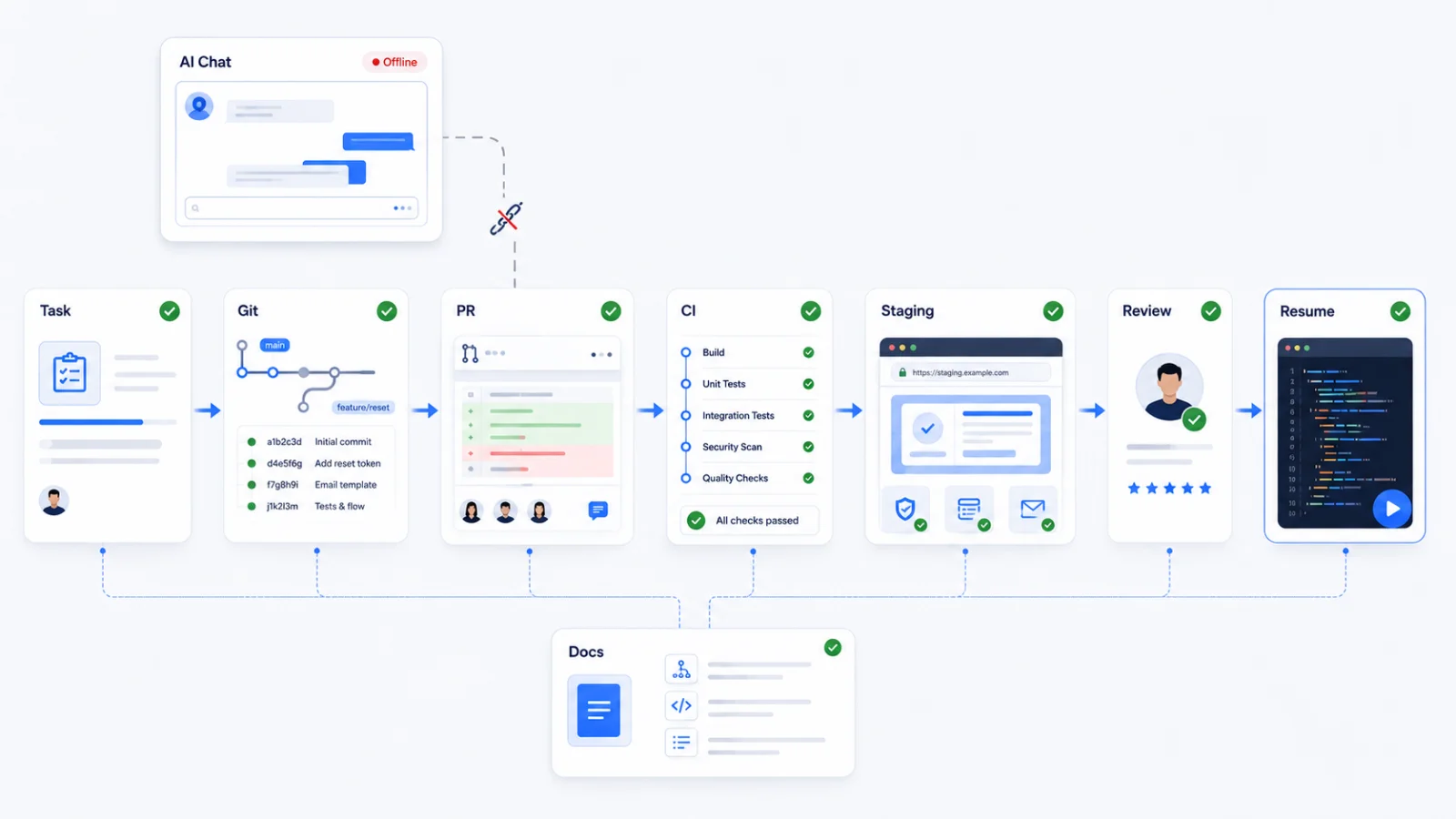
At first, it looked like a tooling problem. But the repository was intact, Git still contained the implementation history, and our development environment continued to work.
What we had temporarily lost was context.
Important details about the current task, previous implementation decisions, unresolved issues, project status and next steps had gradually accumulated inside the AI conversation.
Without that conversation, continuing the work required reconstructing information that should already have existed elsewhere in the engineering process.
That exposed a deeper weakness: the AI assistant had stopped being only a development tool. Its conversation history had quietly become part of the project’s operational memory.
We Call This “Prompt Paralysis”
Prompt Paralysis is our practical term for an operational dependency that develops when important project state, requirements, decisions and next actions exist primarily inside AI conversation history rather than durable engineering systems.
This isn’t about developers forgetting how to code, and it isn’t an argument against AI coding assistants. It’s a workflow problem.
If losing access to an AI conversation makes it difficult to determine what was approved, what changed, what remains unfinished and what should happen next, too much project knowledge is living in the wrong place.
An AI assistant should be able to read project context and act on it. It shouldn’t be the only place where that context exists.
That experience led us to a different question: how do we build an AI-assisted software development workflow that can keep moving even when the AI assistant is unavailable?
The answer is to separate AI execution from project memory and authority.
What Is AI-Assisted Software Development?
AI-assisted software development is an approach where developers use artificial intelligence across the software development lifecycle while humans retain responsibility for requirements, consequential technical decisions, review and final approval.
AI can help generate and explain code, create tests, identify issues and complete approved implementation tasks. The key distinction is that AI operates within the engineering process rather than becoming the project’s source of truth or final authority.
AI Coding Assistants vs. AI Coding Agents
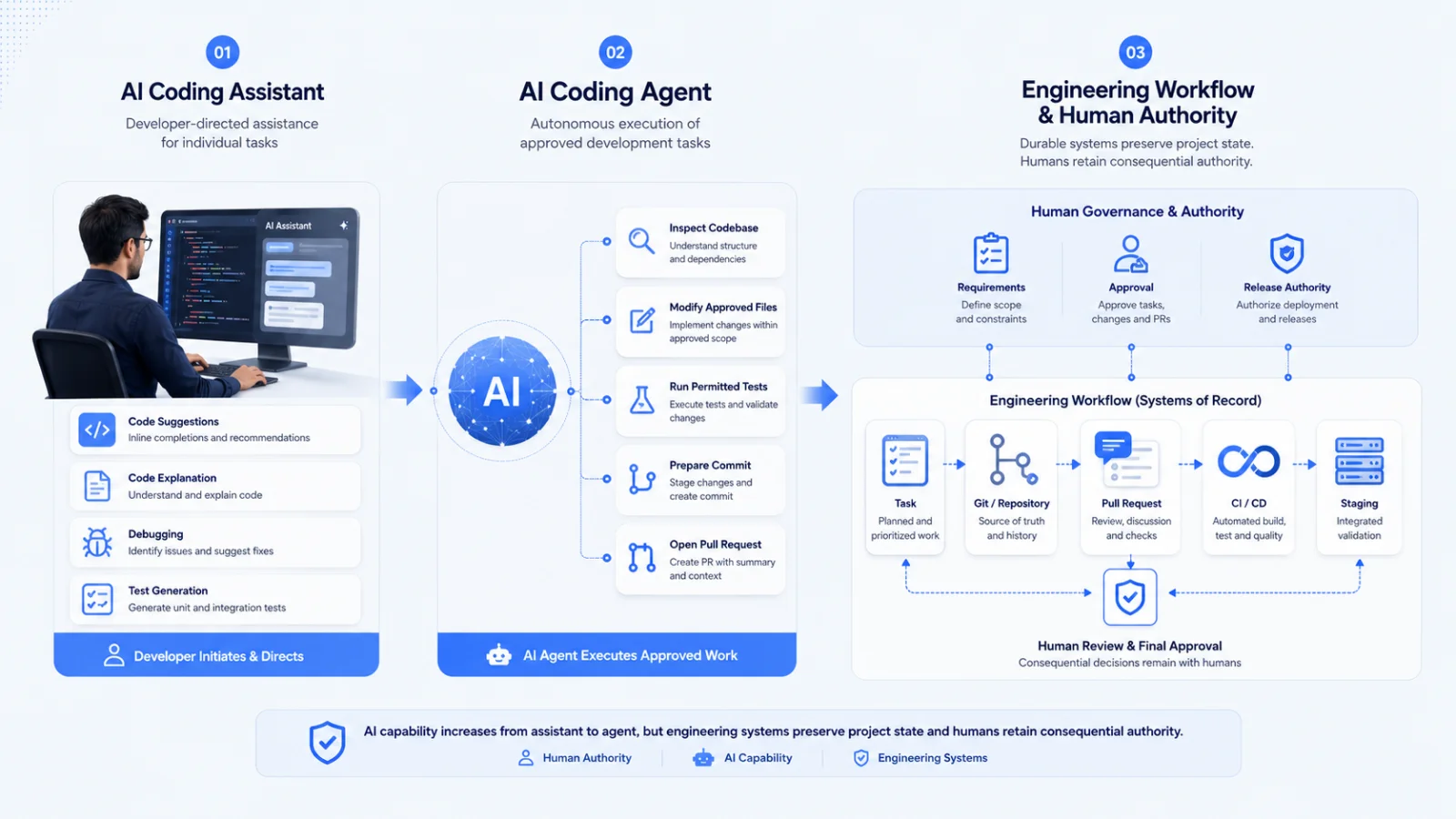
An AI coding assistant primarily helps a developer perform individual tasks, such as suggesting code, explaining logic, generating tests, debugging errors or answering technical questions.
An AI coding agent can work toward a broader objective through multiple actions. Depending on its tools and permissions, it may inspect a codebase, modify files, run permitted tests, prepare commits and open pull requests.
That increased capability changes the engineering question from simply “Can AI write useful code?” to:
- What work is the AI authorized to start?
- Where does it get requirements and project context?
- Which actions can it perform independently?
- How are its changes tested and reviewed?
- Which decisions require human approval?
- Where is the evidence of what it changed?
This is why effective AI-assisted software development requires more than access to a capable model. It requires a defined engineering workflow.

AI Should Execute From the Workflow, Not Replace It
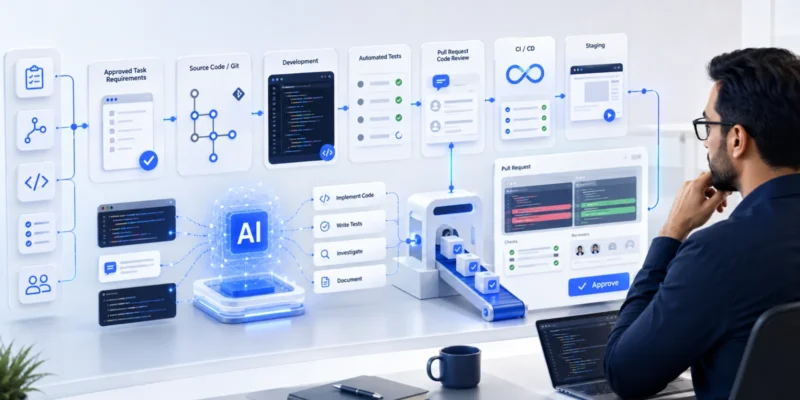
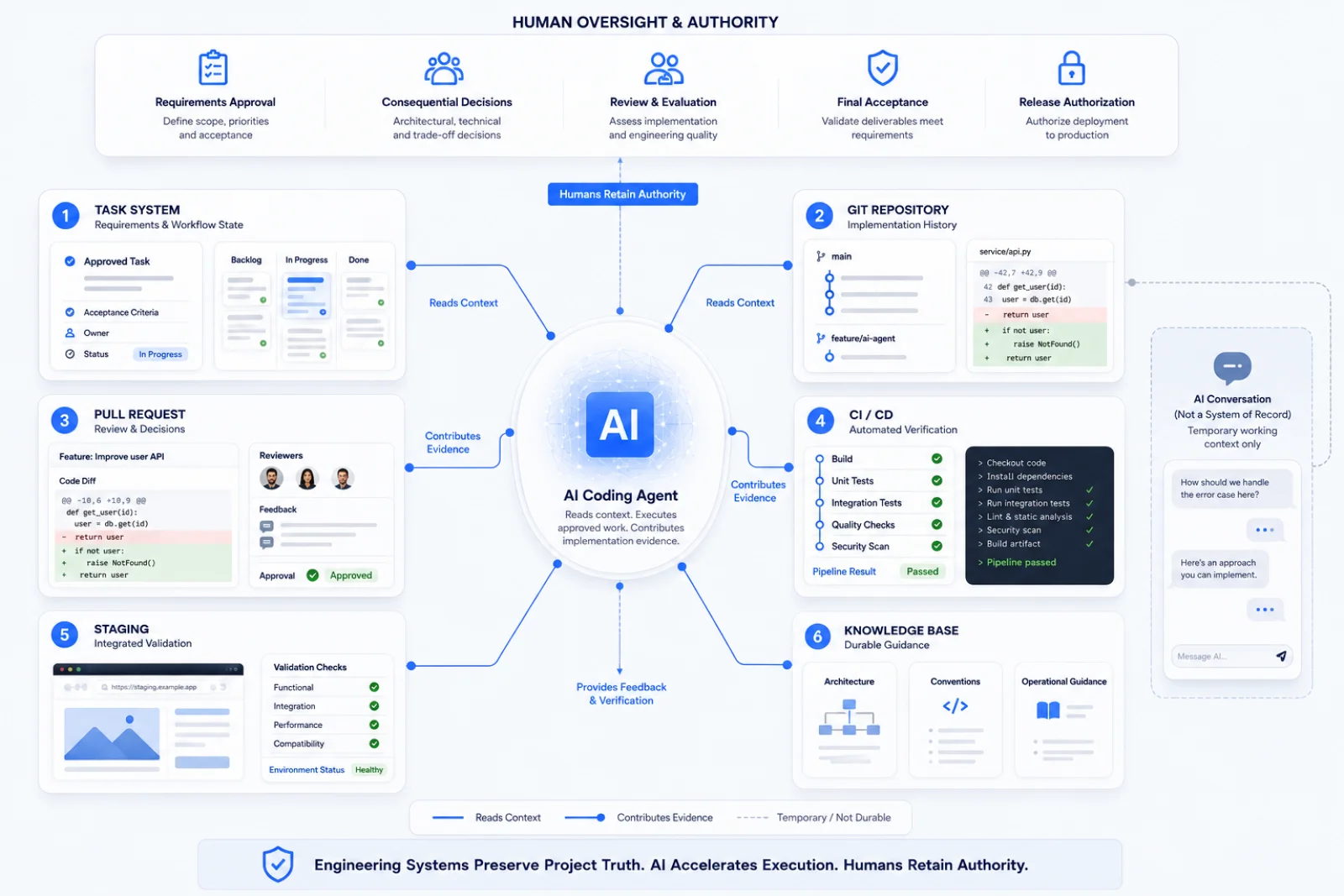
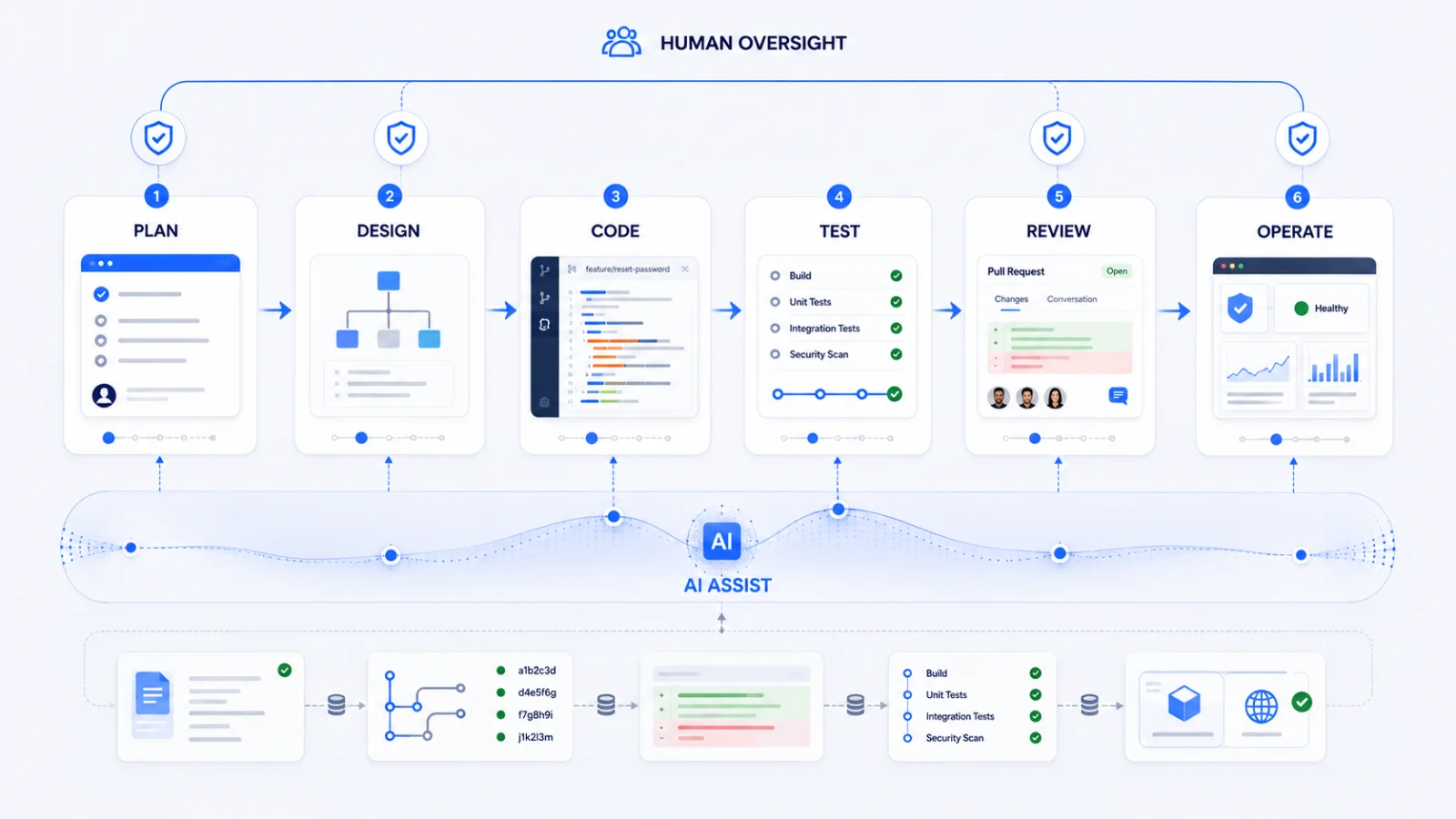
Engineering systems hold project state. AI reads that state, performs approved work and writes its results back into those systems. Humans retain decision authority.
A task system records approved requirements and acceptance criteria. Git preserves implementation history. Pull requests capture proposed changes and review. Automated tests and CI/CD provide verification evidence, while staging supports integrated validation before release.
AI can participate across this process without becoming the source of truth itself. As teams move from conversational coding assistants toward more autonomous AI coding agents, their context, permissions, review requirements and authority boundaries need to become equally explicit.
The Hidden Risk: When the AI Conversation Becomes the Project
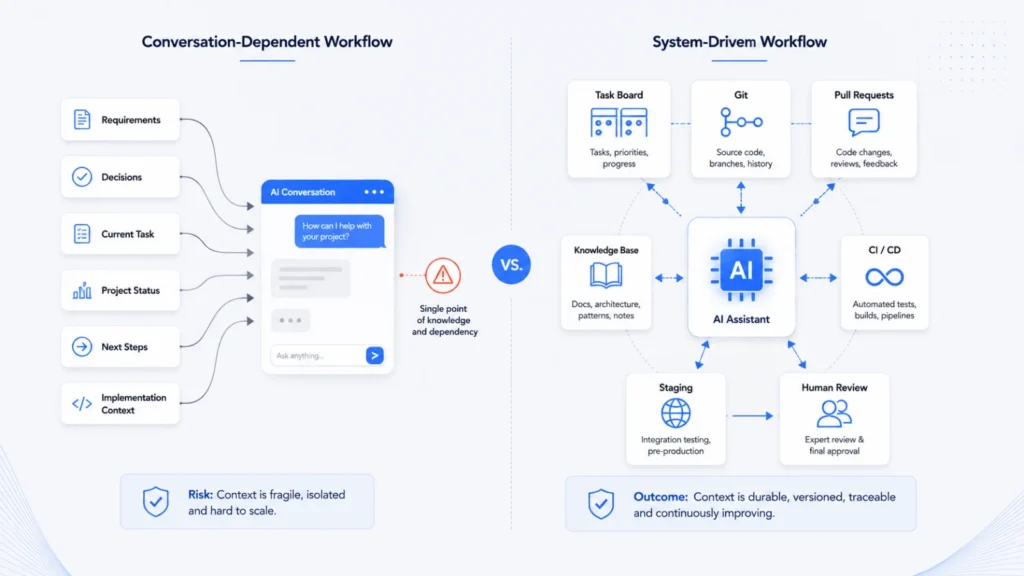
AI conversations are useful working spaces for discussing requirements, debugging issues, comparing implementation options and refining code. The risk appears when information needed to continue the project exists only inside that conversation.
A prompt history may contain a clarified requirement, the reason an implementation approach was chosen, an unresolved blocker or the next action an AI coding agent was expected to perform. When these details aren’t recorded elsewhere, conversation history starts functioning as project infrastructure.
What Is Prompt Paralysis?
Prompt Paralysis is our practical term for this operational dependency:
Prompt Paralysis occurs when important project state, decisions, requirements and next actions exist primarily inside AI conversation history, making development difficult to continue when that context becomes unavailable.
It is not a clinical term, and it doesn’t mean developers are incapable of working without AI. It describes a workflow dependency.
The warning sign is simple: if a developer can access the repository but still cannot confidently determine what should happen next without reading the AI conversation, important project context is probably stored in the wrong place.
Why AI Conversation History Is Not a System of Record
Conversation history can preserve useful working context, but a software team should be able to determine the project’s operational state independently of any individual AI session.
Durable engineering systems should make it possible to identify:
- what work has been approved;
- the current requirements and acceptance criteria;
- which task is active and who—or what—is working on it;
- what has changed in the codebase;
- what has been reviewed and tested;
- what has reached staging;
- what failed and where the evidence exists; and
- who has authority to approve completion or release.
The task system, Git, pull requests, CI/CD and staging each preserve part of that evidence. The AI conversation can help interpret and act on it, but it should not be the only place capable of reconstructing the project.
The AI Development Resilience Test
There is a simple way to test whether an AI-assisted development workflow has become too dependent on prompt history: imagine the AI conversation disappears completely.
Can another qualified developer still answer these questions?
- What work has been approved?
- Which task is currently active?
- Who—or what—is working on it?
- What has changed?
- Which acceptance criteria remain?
- Has the code been reviewed?
- Has the change reached staging?
- Has a human verified the result?
- What failed, and where is the evidence?
- Who authorized completion?
A resilient workflow should answer all ten questions without opening the original AI conversation.
If several answers require reconstructing context from prompts or memory, the solution isn’t simply a larger AI context window. The project needs a stronger system of record.
The developer should be able to follow the project trail, not the prompt history.
Move Project Memory Into Durable Engineering Systems
The solution to Prompt Paralysis isn’t preserving every AI conversation forever. It is giving each type of project information a durable system of record.
An AI coding agent can read from these systems, perform approved work and write evidence back to them. But the project should remain understandable even when the original AI conversation is unavailable.
What Should Be the Source of Truth?
Different engineering systems should own different types of project state:
The principle is simple: store project truth where the team would look for it even if no AI tool existed.

Task System: Requirements and Workflow State
The task system should answer what has been requested, what has been approved, what the acceptance criteria are, who—or what—is responsible for the work, and where the task currently sits in the workflow.
An AI agent may help refine or update a task when permitted, but approved requirements and workflow state should not exist only inside prompt history.
Git: Implementation History
Git should preserve the implementation trail: what changed, when it changed and which branch or commit contains the work. AI-generated code should follow the same version-control discipline as human-written code.
Prompt history is not a substitute for commit history.
Pull Requests: Review and Decision Evidence
A pull request should connect implementation to review. It provides a durable place for the change summary, linked task, testing evidence, reviewer feedback and approval status.
If an AI coding agent prepares a pull request, a human reviewer should still be able to understand the proposed change without reconstructing the agent’s conversation.
CI/CD: Automated Verification Evidence
Tests and CI/CD should record whether the implementation builds successfully and passes the automated checks required by the project.
The AI may run permitted tests and respond to failures, but the resulting evidence should live in the engineering pipeline rather than in a statement such as “the AI said the tests passed.”
Staging: Integrated Validation
Staging provides a shared environment for checking how the change behaves after integration. It is especially useful for user flows, integrations and system behavior that isolated tests may not fully demonstrate.
Passing automated tests and passing human acceptance are related, but they are not the same thing.
Knowledge Base: Durable Guidance, Not Live Task State
A knowledge base is useful for architecture summaries, coding conventions, deployment procedures and other guidance that should survive individual tasks and conversations.
It should not become a duplicate task tracker. Live work belongs in the task system; implementation history belongs in Git; review belongs in pull requests; verification belongs in CI/CD.
A Seven-Stage AI-Assisted Software Development Workflow
Once project context lives in durable engineering systems, the next question is operational: how should work move through an AI-assisted software development workflow?
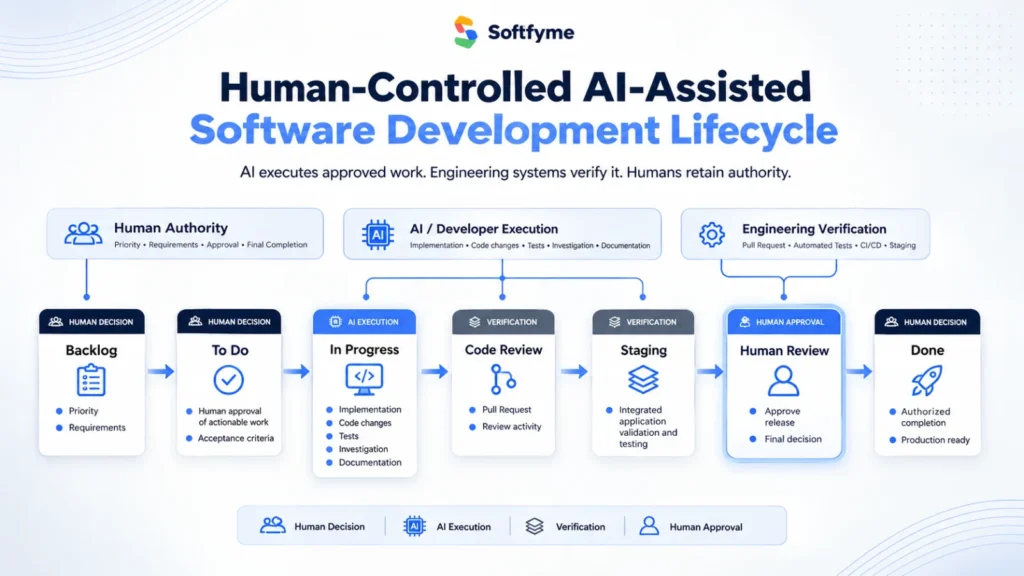
Our model uses seven stages:
Backlog → To Do → In Progress → Code Review → Staging → Human Review → Done
The purpose isn’t to give AI maximum autonomy. It is to make project state visible and separate execution, verification and approval. AI coding agents can participate throughout the workflow, while humans retain authority over priorities, material requirements, consequential decisions and final acceptance.
1. Backlog — Capture Work Before AI Executes It
The Backlog contains identified work that has not yet been approved for implementation. It may include a feature request, bug, technical improvement or business requirement.
AI can help analyze an item, identify missing information or suggest technical considerations. It should not independently decide that an idea has become authorized development work.
Primary authority: Human
2. To Do — Define Approved, Actionable Work
A task moves to To Do when the team has approved it for implementation and provided enough durable context for a developer or AI coding agent to act.
Before implementation starts, the task should define:
- the problem and expected outcome;
- requirements and acceptance criteria;
- relevant dependencies and scope boundaries;
- what the AI is permitted to do; and
- which decisions require human approval.
The AI should receive an approved task rather than infer project priorities from previous conversations.
Primary authority: Human
3. In Progress — AI Executes Within Defined Boundaries
In Progress is where approved implementation happens. Depending on its permissions, an AI coding agent may inspect relevant code, modify files, create or update tests, run permitted commands, prepare commits and document blockers.
If implementation exposes a missing requirement, scope change or consequential decision, the agent should surface it rather than silently make the decision itself.
Primary activity: Human or AI execution within approved scope
4. Code Review — Review the Implementation
Code Review asks whether the proposed implementation is technically acceptable and aligned with the approved task.
Review may examine:
- correctness and code quality;
- alignment with requirements and acceptance criteria;
- test coverage and automated-check results;
- security or architectural concerns; and
- unintended changes or unresolved risks.
AI can assist with code review, explain unfamiliar code or suggest additional tests. AI-generated work should not be considered approved simply because an AI system reports that it looks correct.
Review accountability: Human
5. Staging — Validate the Integrated Result
After technical review and required automated checks, the change can move to a staging environment where the integrated result can be evaluated.
Staging may validate user flows, integrations, acceptance criteria, error states and regressions that isolated tests do not fully expose.
AI can assist with testing and diagnosis, but automated success should not be confused with final acceptance.
Primary purpose: Integrated verification
6. Human Review — Confirm the Intended Outcome
Code Review and Human Review answer different questions. Code Review asks whether the implementation is technically acceptable; Human Review asks whether the resulting feature actually satisfies the intended requirement.
A responsible reviewer can compare the staging result with the acceptance criteria, inspect relevant user or business behavior and request corrections before acceptance.
This creates an explicit gate between “the implementation appears to work” and “we accept this result.”
Approval authority: Human
7. Done — Completion Is an Authorized State
Done should mean more than “the AI finished coding.” A task reaches Done only after the project’s definition of completion has been satisfied.
Depending on the project, that may require:
- approved implementation to be complete;
- acceptance criteria to be satisfied;
- required code review and automated checks to be complete;
- staging and human review to be complete where required;
- relevant documentation to be updated; and
- the appropriate human to authorize completion.
An AI coding agent may report that its assigned implementation work is complete. It should not grant final approval to itself.
Final authority: Human
The Workflow Separates Execution From Authority
The seven stages create a durable project trail. At each point, another qualified developer should be able to determine the state of the work, what evidence exists and what needs to happen next without reconstructing the process from AI conversation history.
- Priority: humans decide what should be worked on.
- Requirements: humans define the required outcome and approve material changes.
- Execution: humans or authorized AI agents can perform approved implementation work.
- Verification: tests, CI/CD, review and staging leave durable evidence.
- Approval: humans decide whether the result is accepted and complete.
AI can accelerate execution without becoming the project’s final authority.
AI Agent Governance: Define What the Agent Can and Cannot Do
AI coding agents become more useful as they gain access to repositories, development tools, tests and workflow systems. But greater capability should come with clearer authority boundaries.
Before an agent starts work, the team should define three things: what it may do independently, what requires human approval, and what it must never authorize on its own.
A Practical AI Agent Permission Model
The exact boundaries will vary by project risk, environment and team structure. A low-risk internal tool may allow broader automation than a healthcare, financial or production-critical system.
The important part is that authority is explicit before execution begins. The agent shouldn’t discover its governance rules while it is already changing the system.
Use Least Privilege for AI Coding Agents
An AI coding agent should receive only the access required to complete its approved task. Repository permissions, development tools, credentials, infrastructure access and deployment capabilities should be limited according to the work it actually needs to perform.
For example, an agent that needs to modify application code and run tests usually does not also need unrestricted production credentials or permission to alter security controls.
Capability does not automatically imply authority.
Require Human Approval for Consequential Decisions
Human approval should be required when an action materially changes the business requirement, architecture, security posture, infrastructure, data or production environment.
This does not mean a human must approve every line of AI-generated code before the agent can continue. The goal is to place approval gates around consequential decisions while allowing routine, reversible work to remain efficient.
AI Must Leave Durable Evidence
Agent activity should produce the same kinds of engineering evidence expected from human development work: task updates, code changes, commits, tests, pull requests, CI results and documented blockers where appropriate.
If an agent fails or becomes unavailable, another qualified developer should be able to inspect that evidence and determine what the agent attempted, what changed, what passed, what failed and what still requires a decision.
Example: Building a Password Reset Feature With an AI Coding Agent
The governance model becomes easier to understand when applied to a practical development task. Consider a common requirement: add a secure password reset feature to an existing web application.
An AI coding agent may be capable of inspecting the authentication system, modifying backend and interface code, creating tests and preparing a pull request. But capability alone doesn’t define the business requirement, security policy or conditions for final acceptance.
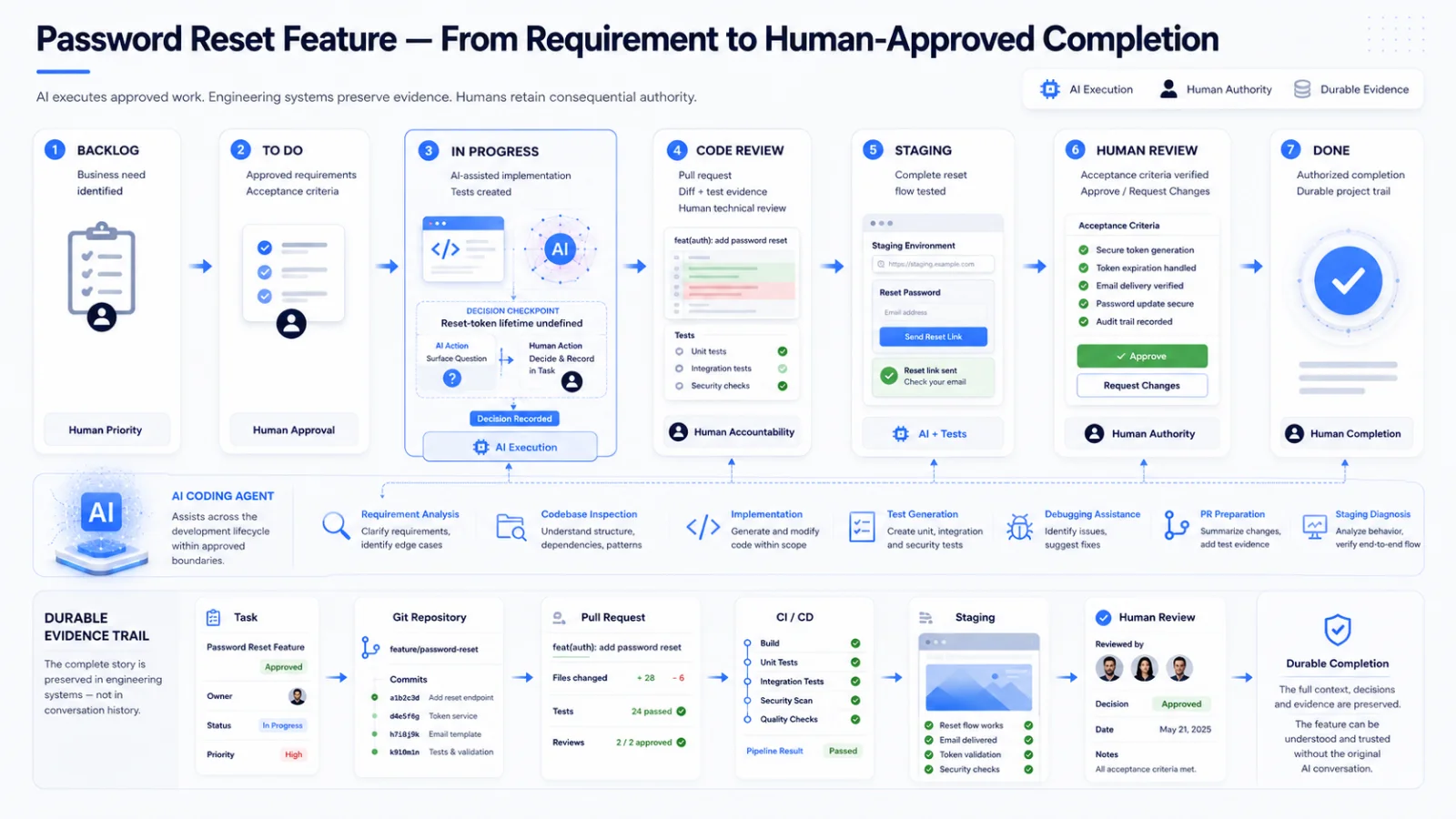
Here is how the feature can move through the seven-stage human-controlled workflow.
1. Backlog — Define the Business Need
The feature begins with an intended outcome: users who forget their password need a secure way to regain access to their account.
AI can help identify implementation questions, but humans remain responsible for deciding whether the feature should be prioritized and for resolving requirements such as token validity, account-disclosure behavior, rate limiting and applicable security policies.
2. To Do — Turn the Requirement Into Approved Work
Before implementation starts, the approved task should define the expected behavior and acceptance criteria. For example:
- provide a password-reset entry point;
- use the application’s approved email mechanism;
- use the approved reset-token policy;
- allow an eligible user to set a new password;
- handle invalid and expired reset attempts safely;
- avoid unnecessary disclosure of account information; and
- preserve existing authentication behavior.
The AI coding agent now has a durable specification to work from instead of reconstructing requirements from conversation history.
3. In Progress — Implement Within the Approved Scope
The agent can inspect the relevant authentication flow and, within its permissions, modify the required code, integrate the existing email mechanism, implement reset handling, add validation, create tests and run permitted development commands.
If it discovers an unresolved requirement—for example, the reset-token lifetime is not defined—it should surface the ambiguity rather than silently turn an assumption into policy. The decision is resolved by the appropriate human and recorded in the task.
4. Code Review — Inspect the Actual Change
When implementation is ready, the pull request connects the code back to the approved task. Review should focus on the actual diff, tests and implementation evidence.
For a password-reset feature, that may include token handling, expiry and reuse, account-disclosure behavior, authentication regressions, test coverage and whether unrelated code was changed.
The AI agent can assist with analysis and prepare the pull request. It doesn’t approve its own implementation.
5. Staging — Validate the Complete User Flow
After the required technical review and automated checks, staging provides a shared environment for validating the integrated feature.
- Initiate the password-reset request.
- Verify the approved account-disclosure behavior.
- Confirm the expected reset communication is generated.
- Complete a valid password-reset flow.
- Verify invalid or expired reset attempts are rejected.
- Confirm used reset mechanisms cannot be reused where prohibited.
- Verify the new password works.
- Confirm existing authentication behavior still works.
If staging exposes a problem, the task returns to implementation with durable evidence of what failed. It doesn’t become Done simply because the AI finished coding.
6. Human Review — Confirm the Intended Outcome
A human reviewer compares the staging result with the approved acceptance criteria and determines whether the feature behaves as intended from both a product and engineering perspective.
The reviewer can approve the result or request changes. This acceptance gate cannot be granted by the AI agent to itself.
7. Done — Preserve an Inspectable Project Trail
Once the completion criteria are satisfied and an authorized human approves the result, the task can move to Done.
The completed feature should now be reconstructable from durable evidence:
- Task system: approved requirement and acceptance criteria;
- Git: implementation history;
- Pull request: change and review trail;
- CI/CD: automated verification evidence;
- Staging: integrated validation; and
- Human review: final acceptance.
What the Password Reset Example Shows
This is human-controlled AI-assisted software development in practice: the AI coding agent can perform substantial implementation work while requirements, evidence and consequential approval remain outside the agent.
A Task Template for AI-Assisted Software Development
An AI coding agent should not need to reconstruct an approved task from conversation history. Before implementation begins, the task should contain enough durable context for a developer or authorized AI agent to understand what needs to change, what success means and where its authority stops.
The following template provides a practical starting point.
1. Task Objective
State the required outcome in one or two sentences.
Example: Add a password reset flow that allows eligible users to securely regain access to their account.
2. Requirements
Record the approved behavior the implementation must support.
- functional requirements;
- relevant business rules;
- integration requirements;
- security or compliance constraints where applicable; and
- known technical boundaries.
3. Acceptance Criteria
Define observable conditions that determine whether the task has been completed successfully.
- expected user or system behavior;
- important success paths;
- required failure or edge-case behavior; and
- regression expectations.
4. Relevant Project Context
Point the developer or AI agent toward the durable context needed for the task rather than copying an entire project history into the prompt.
- relevant repository or module;
- related tasks or issues;
- architecture or technical documentation;
- existing patterns that should be followed; and
- dependencies or integrations affected by the change.
5. AI Permissions
Define what the AI coding agent is authorized to do while completing this task.
- which files or modules it may inspect or modify;
- which development commands it may run;
- whether it may create or update tests;
- whether it may create commits or prepare a pull request; and
- which tools or environments it may access.
6. Human Approval Gates
Identify decisions the agent must stop and escalate rather than resolve independently.
- material requirement or scope changes;
- consequential architecture decisions;
- sensitive security or infrastructure changes;
- destructive operations; and
- production-impacting actions.
7. Verification Requirements
Specify what evidence should exist before the implementation can move forward.
- required automated tests;
- build or CI checks;
- code-review requirements;
- staging validation where applicable; and
- human acceptance requirements.
8. Definition of Done
Define the conditions required before the task can be considered complete.
- approved implementation is complete;
- acceptance criteria are satisfied;
- required tests and reviews have passed;
- relevant documentation has been updated;
- known blockers are resolved or explicitly recorded; and
- an authorized human has approved completion where required.
The goal isn’t to make every task document longer. It is to make the task complete enough that another qualified developer—or another authorized AI agent—can continue the work without reconstructing the original conversation.
Pull Request Template for AI-Generated Code
A well-defined task records what was approved. The pull request should record what was implemented, how it was verified, what remains unresolved and how the change was reviewed.
This is especially important for AI-assisted development. An AI-generated summary can help explain a change, but it should not replace the diff, tests, CI results or human review evidence.
The following template can be adapted to GitHub, GitLab, Bitbucket or a similar pull-request workflow.
AI-Assisted Pull Request Template
1. Task Reference
Link the pull request to the approved task or issue so reviewers can verify the original requirements and acceptance criteria.
Example: AUTH-142 — Add secure password reset flow
2. Implementation Summary
Briefly describe what was actually changed. Focus on the implementation rather than repeating the complete requirement.
Example: Implemented the approved password-reset flow, including request handling, reset validation, email-service integration and automated tests.
3. Components or Files Affected
Identify the main parts of the system touched by the change so the reviewer can understand its scope before inspecting the complete diff.
- services or application modules;
- API endpoints or controllers;
- database or data-model changes;
- UI components;
- integrations; and
- tests.
4. AI Involvement
Record meaningful AI participation where it helps reviewers understand how the implementation was produced.
This may include:
- codebase inspection;
- implementation within the approved task;
- test generation;
- debugging;
- permitted test execution; or
- preparation of the pull-request summary.
The purpose isn’t to label every line as human- or AI-generated. It is to make relevant AI involvement visible without treating the AI’s description as verification.
5. Verification Performed
Record how the implementation was checked and link to durable evidence where available.
- automated tests;
- build and CI checks;
- static analysis or linting;
- relevant integration tests;
- manual verification; and
- staging validation where applicable.
Use recorded results rather than statements such as “the AI confirmed that the tests passed.”
6. Acceptance Criteria Status
Show whether the approved acceptance criteria have been satisfied and identify anything still pending.
- Met: verified criteria;
- Pending: criteria awaiting validation; and
- Blocked: criteria that cannot yet be completed.
7. Risks and Security Considerations
Highlight material risks that deserve reviewer attention, particularly changes involving authentication, authorization, sensitive data, dependencies, infrastructure or security controls.
If no material concern was identified, record that clearly rather than leaving the section ambiguous. AI can assist with risk identification, but it should not be treated as the final authority on whether a security-sensitive change is safe.
8. Known Limitations or Open Questions
Record unresolved issues, out-of-scope work, assumptions or follow-up tasks that reviewers should understand before approval.
This prevents unfinished context from disappearing back into the AI conversation.
9. Evidence
Attach or link the artifacts reviewers need to verify important implementation claims.
- CI/CD run;
- test results;
- staging URL;
- screenshots where useful;
- logs or API responses; and
- other relevant verification artifacts.
Evidence should support the implementation claim rather than merely repeat it.
Human Reviewer Checklist
- Does the pull request map to an approved task?
- Does the implementation remain within the approved scope?
- Have material requirement changes been approved?
- Has the actual diff been reviewed?
- Have required tests and automated checks been examined?
- Have security-sensitive changes received appropriate review?
- Are known limitations and blockers visible?
- Has required staging validation been completed or clearly marked as pending?
- Are the acceptance criteria satisfied or outstanding items documented?
The Pull Request Becomes Part of the Project Trail
The task and pull request serve different purposes: the task records what was approved; the pull request records what was implemented and how it was reviewed.
Git preserves the underlying change history, CI/CD records automated verification, staging provides integrated validation, and human review records the relevant approval decision.
Together, these systems allow another engineer to inspect the work without asking the original AI conversation, “What did you change, and did it work?”
The evidence should already exist.
What to Do When Your AI Coding Assistant Goes Offline
An AI assistant outage should interrupt a tool—not erase the team’s understanding of the project.
If requirements, implementation history, verification evidence and decisions have been preserved in durable engineering systems, another developer or authorized AI agent should be able to reconstruct the current state without recovering the original conversation.
A Practical AI Development Recovery Checklist
When the AI coding assistant becomes unavailable, recover the project from its systems of record in this order:
- Read the approved task.
Confirm the objective, requirements, acceptance criteria, scope and current workflow state. - Inspect Git.
Review the active branch, recent commits and code changes to determine what has already been implemented. - Check the pull request.
Review the proposed change, discussion, requested changes, unresolved comments and approval status. - Review CI/CD and test evidence.
Determine which builds and checks passed, what failed and whether any verification remains incomplete. - Inspect the staging state.
If the change reached staging, verify what was deployed and what integrated behavior has already been tested. - Read human feedback.
Check review comments, acceptance feedback, blockers and decisions that affect the next action. - Consult durable documentation where needed.
Use architecture notes, conventions or operational guidance for context that belongs beyond the individual task. - Resume from the last verified state.
Continue from the evidence already recorded rather than attempting to reconstruct the missing AI conversation.
What Should Be Recoverable Without the Original AI Conversation?
A resilient project should allow another qualified engineer to determine:
- what was approved;
- what has already been implemented;
- what changed in the codebase;
- which tests and checks have passed or failed;
- what has been reviewed;
- what reached staging;
- which decisions or blockers remain unresolved; and
- what should happen next.
If that information exists across the task system, Git, pull requests, CI/CD, staging and durable documentation, the AI assistant can later return without becoming the only mechanism for recovering the project.
The goal is not conversation recovery. It is project-state recovery.
Adopting This Workflow Without Slowing the Team Down
A human-controlled AI development workflow should improve engineering reliability without turning routine work into an approval queue.
The practical approach is to introduce controls gradually. Start with durable project context and visible evidence, then add stricter approval gates where the consequences justify them.
1. Start With Durable Project Context
Before increasing AI autonomy, make sure the project’s essential state already exists outside AI conversations.
- approved work lives in the task system;
- requirements and acceptance criteria are recorded;
- implementation history lives in Git;
- review happens through pull requests; and
- verification evidence is preserved in tests and CI/CD.
This alone removes much of the dependency on prompt history.
2. Define AI Permissions by Risk
Not every AI action needs the same level of control. Routine and reversible work can usually support greater autonomy than actions involving sensitive data, security, infrastructure or production systems.
Define what the agent may do independently, what requires approval and what it may never authorize itself.
3. Put Human Gates Around Consequential Decisions
Human approval should focus on decisions where the cost of an incorrect assumption is meaningful.
Typical approval points include:
- material requirement or scope changes;
- consequential architecture decisions;
- security-sensitive changes;
- destructive operations;
- production-impacting actions; and
- final acceptance where required.
This keeps human attention focused on decisions rather than routine execution.
4. Automate Evidence, Not Authority
Use automation aggressively where it creates reliable evidence: tests, builds, static analysis, CI/CD checks, deployment records and other repeatable verification.
But distinguish automated evidence from approval. A successful pipeline can demonstrate that defined checks passed; it does not automatically determine whether a business requirement has been satisfied or a consequential change should be accepted.
5. Increase AI Autonomy Gradually
As the workflow becomes more reliable, teams can expand AI permissions for well-understood, reversible tasks while keeping stronger controls around higher-risk actions.
A useful progression is:
- Assist: AI suggests and explains.
- Execute: AI performs approved development tasks within defined boundaries.
- Verify: AI runs permitted checks and records evidence.
- Escalate: AI stops when a decision exceeds its authority.
The goal is not to put a human approval step in front of every AI action. It is to give AI enough freedom to accelerate routine engineering work while keeping consequential authority where it belongs.
How AI Fits Across the Software Development Lifecycle
AI-assisted software development extends beyond code generation. AI can support work across the software development lifecycle (SDLC), from requirement analysis and implementation to testing, review and operational support.
But the appropriate level of autonomy changes with the task. Routine, reversible engineering work can often support greater AI participation, while decisions involving business requirements, architecture, security, production systems or final acceptance need stronger human oversight.
Requirements and Planning
AI can help analyze requirements, identify ambiguity, break approved work into smaller tasks and surface missing acceptance criteria.
Humans remain responsible for the intended business outcome, priority and approval of material requirement changes.
Architecture and Design
AI can compare implementation approaches, inspect existing patterns and help document technical options. It can also surface dependencies, integration concerns and potential trade-offs.
Consequential architecture decisions should remain reviewable and explicitly approved rather than becoming hidden assumptions inside an AI conversation.
Development
This is where AI coding agents can take a more active role. Within an approved task and defined permissions, they may inspect code, modify files, generate tests, run permitted commands, debug failures and prepare commits or pull requests.
The implementation should still leave a durable trail in Git and the surrounding engineering workflow.
Testing and Verification
AI can generate test cases, run permitted tests, investigate failures and suggest additional coverage. Automated pipelines can then record build, test and quality-check results.
AI-generated verification claims should not replace recorded test and CI/CD evidence.
Review and Acceptance
AI can assist reviewers by summarizing changes, identifying potential issues and explaining unfamiliar code. But technical assistance is different from approval.
Human reviewers remain responsible for consequential review decisions and for confirming that the integrated result satisfies the intended requirement.
Deployment and Operations
AI can support deployment preparation, log analysis, incident investigation and operational troubleshooting where appropriate permissions exist.
Production access and release authority should reflect the risk of the environment. An agent’s ability to perform an action does not automatically mean it should be authorized to perform it independently.
The Pattern Across the SDLC
The appropriate AI role changes across the lifecycle, but the underlying model remains consistent:
- Humans define intent and consequential boundaries.
- AI assists or executes approved work.
- Engineering systems preserve project state and evidence.
- Humans retain consequential approval authority.
The objective is not maximum AI autonomy at every stage. It is to use AI where it improves engineering throughput while keeping the development process traceable, reviewable and recoverable.
Frequently Asked Questions
What is AI-assisted software development?
AI-assisted software development is an approach in which developers use artificial intelligence to support activities such as requirements analysis, coding, testing, debugging and review while humans retain responsibility for project requirements, consequential decisions, approval and final outcomes.
The AI participates in the software development process without becoming the project’s sole source of context or authority.
What is an AI coding agent?
An AI coding agent is an AI system capable of performing multi-step software development tasks rather than only providing individual code suggestions.
Depending on its tools and permissions, an AI coding agent may inspect a codebase, modify files, create tests, run permitted commands, prepare commits and open pull requests. The actions it is technically capable of performing should be distinguished from the actions it is authorized to perform.
What is Prompt Paralysis?
Prompt Paralysis is our practical term for an operational dependency where important project state, requirements, decisions or next actions exist primarily inside AI conversation history.
When this happens, losing access to the conversation can make development difficult to continue even though the source code and development tools remain available.
Prompt Paralysis is a workflow problem, not a clinical diagnosis.
Is Prompt Paralysis the same as forgetting how to code?
No.
Prompt Paralysis doesn’t mean a developer has forgotten how to write software or has become incapable of working without AI.
It describes a situation where too much project context has accumulated inside AI conversation history instead of durable engineering systems. A developer may still have full access to the codebase but lack the requirements, decisions, current status or next actions needed to continue confidently.
Does a structured workflow reduce the value of AI coding assistants?
No. The objective is to make AI more useful without making the project dependent on a particular conversation.
When requirements, code history, tests and review evidence have durable homes, an AI coding assistant can consume clearer project context and contribute work back to systems that developers can inspect independently.
The AI remains an accelerator rather than becoming the project’s memory.
How should AI coding agents be governed?
AI coding agents should operate with explicit permissions, defined human approval gates and traceable engineering evidence.
Teams should establish what an agent may do, which actions require approval and which decisions remain outside autonomous AI authority. In the workflow described here, humans retain authority over priority, material requirements, approval, production authorization and final completion.
Can an AI coding agent move tasks between workflow statuses?
Potentially, but status changes should follow defined workflow rules rather than unrestricted agent discretion.
For example, an agent might update a task from In Progress to Code Review after completing approved implementation work and opening a pull request. It shouldn’t independently move unapproved backlog work into active development or mark its own work Done when final completion requires human approval.
Automation of status changes should reflect the authority represented by each status.
Why is Human Review separate from Code Review?
Code Review and Human Review answer different questions.
Code Review evaluates the implementation: code quality, technical correctness, tests, risks and whether the change matches the approved task.
Human Review evaluates the resulting outcome: whether the integrated feature behaves as intended and satisfies the relevant acceptance criteria.
A technically acceptable implementation can still fail to deliver the intended product behavior.
Can automated tests replace staging review?
Not in every situation.
Automated tests provide valuable repeatable verification, but they only verify the conditions they were designed to test. Staging allows teams to inspect integrated behavior, user flows, system interactions and other issues that may not be visible through isolated automated checks.
The amount of staging validation should reflect the nature and risk of the change rather than applying identical review depth to every task.
Should the knowledge base become the project’s source of truth?
Not for everything.
A knowledge base is useful for durable guidance such as architecture summaries, development conventions, standards and operational procedures.
But live task status should remain in the task system, implementation history in Git, review decisions in pull requests, and automated verification evidence in the appropriate CI/CD systems.
Different types of project truth should have appropriate authoritative homes.
Does every development team need all seven workflow stages?
No.
The seven-stage model—Backlog → To Do → In Progress → Code Review → Staging → Human Review → Done—is a practical framework, not a mandatory task-board configuration.
Smaller teams may combine stages, while higher-risk projects may add more controls. What matters is that project state remains visible, implementation is traceable, verification leaves evidence and decision authority is clear.
Can AI coding agents deploy software without human approval?
Technically, some AI agents may be capable of triggering deployment processes if they are given the necessary access.
That doesn’t mean they should automatically receive production authority.
In the human-controlled model described in this article, production authorization remains an explicit control outside autonomous AI authority. Organizations can define stricter controls based on the sensitivity of the application, environment and change.
What happens if an AI coding assistant goes offline during development?
A resilient development workflow should allow the team to continue by following durable project evidence.
Start with the approved task, inspect the working branch and Git history, review the pull request and CI/CD results, check staging status and identify recorded human feedback. Another developer—or another approved AI tool—can then continue from the last verified state without reconstructing the entire project from prompt history.
The principle is simple:
Follow the project trail, not the prompt history.
Build With AI Without Making AI the Single Point of Failure
The temporary loss of our AI coding assistant exposed something more important than a tooling inconvenience.
The code was still there. Git was still there. The development environment still worked.
What became difficult to recover was the project context that had accumulated inside the AI conversation.
That experience led us to a simple principle:
AI should accelerate the software development workflow without becoming the only place that understands it.
A resilient AI-assisted development process separates three responsibilities.
AI provides execution and acceleration.
It can analyze requirements, inspect code, implement approved changes, generate tests, investigate failures, prepare commits and assist with review.
Engineering systems preserve project memory and evidence.
Tasks record requirements and status. Git records implementation history. Pull requests preserve review context. CI/CD records automated verification. Staging exposes the integrated result. Maintained documentation preserves durable engineering guidance.
Humans retain authority.
People decide priorities, approve material requirements, evaluate consequential decisions, accept outcomes and control final completion.
This doesn’t reduce the usefulness of AI coding agents.
It creates the conditions for using them more responsibly.
As AI agents become capable of handling larger portions of software development, teams don’t need to make the prompt larger and larger until it contains the entire project.
They need a workflow that both humans and AI can follow.
So ask one question about your current development process:
If your AI coding assistant disappeared today, could another developer determine what was approved, what changed, what was verified and what needs to happen next?
If the answer is yes, your AI assistant is participating in the engineering system.
If the answer is no, part of the engineering system may be living inside the prompt.
The goal isn’t to build software without AI.
It’s to build with AI without making AI the single point of failure.